
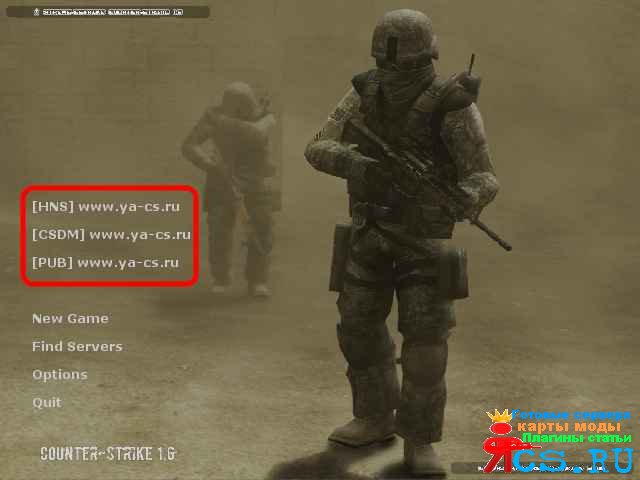
Описание:
Статья о том как установить свои или часто посещаемые сервера к себе в меню в Counter Strike,что бы просто делать connect прям с меню
Установка:
Путь:
(ваша кс\\cstrike\\resource)
Открываем файл:
GameMenu.res (Блокнотом)
Пример:
Показать / Скрыть текст
\”GameMenu\”
{
\”1\”
{
\”label\” \”#GameUI_GameMenu_ResumeGame\”
\”command\” \”ResumeGame\”
\”OnlyInGame\” \”1\”
}
\”2\”
{
\”label\” \”#GameUI_GameMenu_Disconnect\”
\”command\” \”Disconnect\”
\”OnlyInGame\” \”1\”
\”notsingle\” \”1\”
}
\”4\”
{
\”label\” \”#GameUI_GameMenu_PlayerList\”
\”command\” \”OpenPlayerListDialog\”
\”OnlyInGame\” \”1\”
\”notsingle\” \”1\”
}
\”8\”
{
\”label\” \”\”
}
\”9\”{
\”label\” \”[My Server]\”
\”command\” \”engine connect (здесь пишите IP адрес:порт)\”
}
\”10\”
{
\”label\” \”[My Classic]\”
\”command\” \”engine connect (здесь пишите IP адрес:порт)\”
}
\”11\”
{
\”label\” \”[My Public]\”
\”command\” \”engine connect (здесь пишите IP адрес:порт)\”
}\”12\”
{
\”label\” \”\”
}
\”13\”
{
\”label\” \”#GameUI_GameMenu_NewGame\”
\”command\” \”OpenCreateMultiplayerGameDialog\”
}
\”14\”
{
\”label\” \”#GameUI_GameMenu_FindServers\”
\”command\” \”OpenServerBrowser\”
}
\”15\”
{
\”label\” \”#GameUI_GameMenu_Options\”
\”command\” \”OpenOptionsDialog\”
}
\”16\”
{
\”label\” \”#GameUI_GameMenu_Quit\”
\”command\” \”Quit\”
}
}
Всё, теперь при входе в игру у Вас будет быстрый коннект к игровым серверам!



Коментарі 0